
The invoice
Treatment Roomthe patientFile
ReceptionDoctorMedical CoordinatorClinic Administrator
The invoice holds the patient’s performed treatments not invoiced yet, each with its price and discount. Digiodent
makes it out to the patient or, for a minor, to the legal representative, and posts it at once: a posted invoice never
goes back to draft. A mistake is corrected with a credit note: the invoice’s treatments move to the corrected invoice,
while a credit note made with Reverse alone puts them back to To Invoice.
Invoice the treatments performed
Section titled “Invoice the treatments performed”The invoice opens Posted, with one line per treatment.
Send the invoice through e-Factura
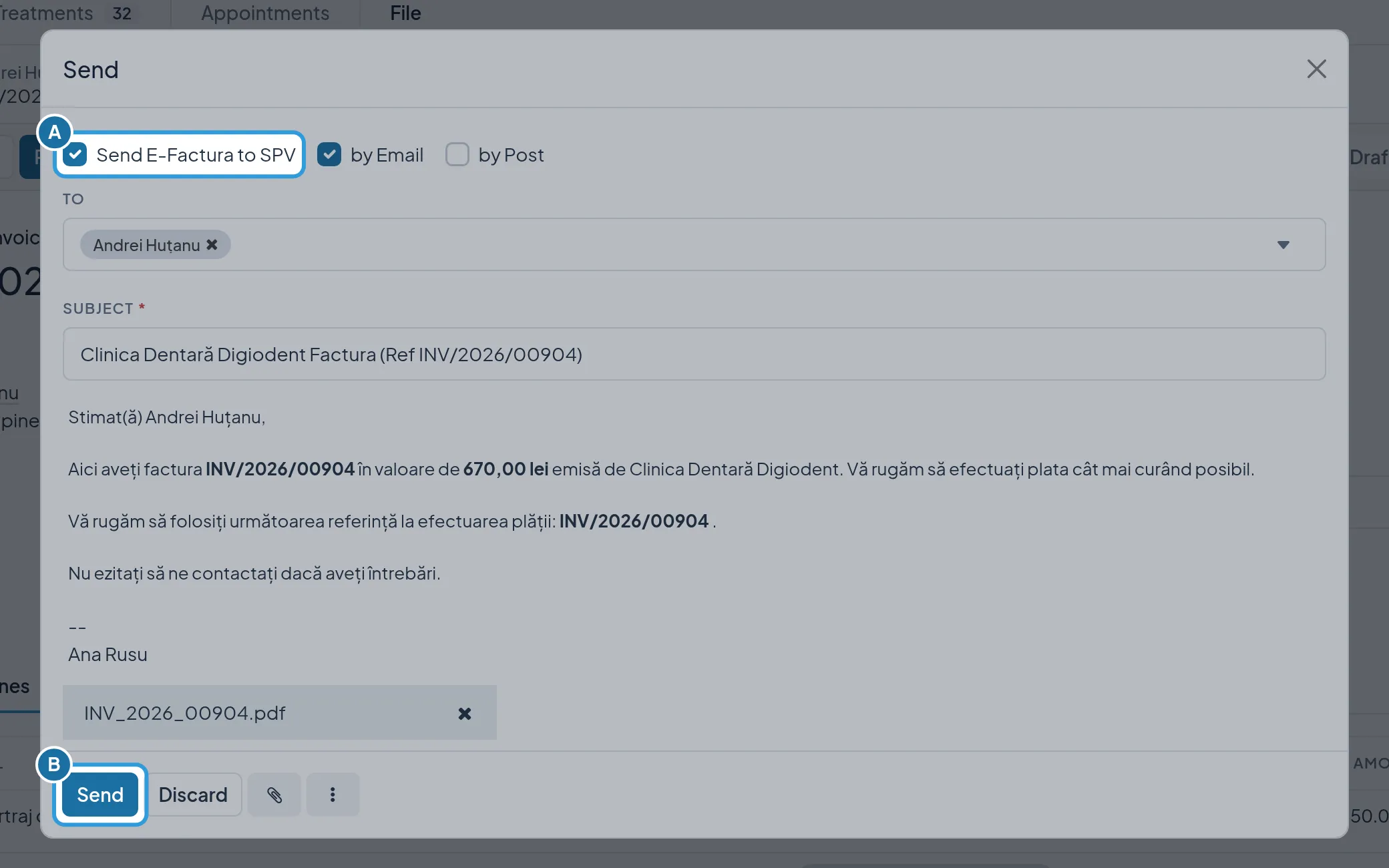
Section titled “Send the invoice through e-Factura”- Tap
Send, on the invoice. - Tap
Send(B), in the window.
With Send E-Factura to SPV (A) ticked, the invoice goes to SPV and E-Factura Status shows Sent; the patient also
gets it by e-mail.
Correct the invoice with a credit note
Section titled “Correct the invoice with a credit note”The credit note cancels the wrong invoice, and its treatments move, at the corrected price, to the new invoice, Posted.