
What the odontogram's colours and drawings mean
Treatment Roomthe patientOdontogram
Medical AssistantDoctorMedical Coordinator
The odontogram draws on every tooth what was noted and what was done on it. Each drawing below is the one in the app’s legend, beside what the finding means and how you recognise it on the odontogram.
Open the legend
Section titled “Open the legend”- Tap the “i” button,
What the colours and drawings mean, at the bottom of the odontogram’s left bar.
Legend opens over the odontogram; close it by tapping ×.
Findings on the tooth’s surfaces
Section titled “Findings on the tooth’s surfaces”Caries, fillings, recurrent caries and caries at the gum line are noted on the affected surface, in the tooth’s panel:
tapping the same surface again goes from caries to a filling, then to recurrent caries. A sealant is noted on the whole
tooth, under More.
| Drawing | Finding | What it means | How you recognise it |
|---|---|---|---|
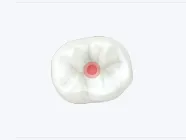 |
Caries |
Untreated caries, on the surfaces you marked. | Red on the affected surface, and the tooth number shows on red. |
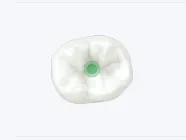 |
Existing Filling |
A filling the tooth already has. | Green on the surface. |
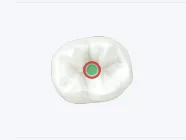 |
Recurrent Caries |
Caries that has come back next to a filling. | Green ringed in red; orange in the 3D view. |
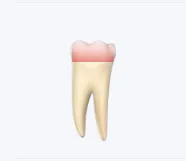 |
Caries at the gum line |
Caries at the edge of the gum. | Red fading away from the gum. |
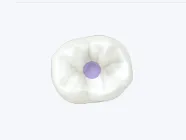 |
Sealant |
A sealant protecting the grooves of the biting surface. | Violet on the biting surface. |
Findings on the tooth
Section titled “Findings on the tooth”Noted in the tooth’s panel: Not Present, Crown, Root Canal, Retained Root and Fracture are in view, while
Implant, Bridge Pontic, Post and Veneer are under More. Splinted teeth show once the doctor has performed the
splinting.
| Drawing | Finding | What it means | How you recognise it |
|---|---|---|---|
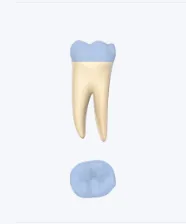 |
Crown |
A prosthetic crown on the tooth. | Blue-grey over the crown of the tooth. |
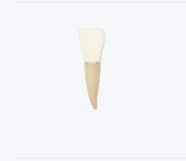 |
Veneer |
A veneer bonded to the front face. | Cream over the front face. |
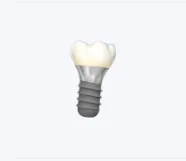 |
Implant |
An implant in place of the root, with its crown. | A screw in place of the root, under the crown. |
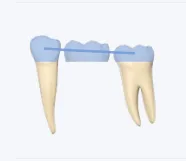 |
Bridge |
A bridge pontic: a tooth with no root, held by the teeth next to it. | The pontic has no root; a line joins it to the teeth holding it. |
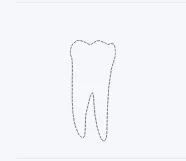 |
Not Present |
The tooth is missing. | Only a dashed outline. |
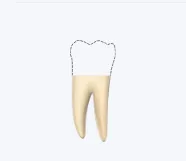 |
Retained Root |
Only the root is left of the tooth: above the gum, below it or a small fragment. | The tooth is drawn up to where the root is left, the rest outlined. |
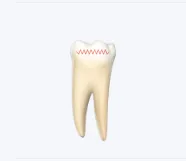 |
Fracture |
The tooth is fractured, on the crown or the root, vertically or horizontally. | A zigzag line across the crown or the root. |
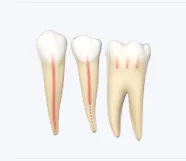 |
Root Canal |
The tooth’s canals are treated: completely, partially or only the pulp chamber (pulpotomy). | Red in the canals: down to the tip when complete, dotted after the filling when partial, only in the pulp chamber for a pulpotomy. |
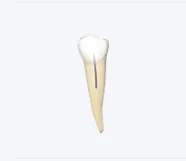 |
Post |
A post in the canal, holding the tooth’s build-up. | Grey in the canal. |
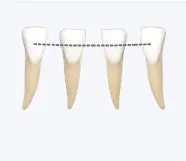 |
Splinted teeth |
Teeth tied together so they do not move. | A line joins the splinted teeth. |
Findings on the arch
Section titled “Findings on the arch”Noted on the whole arch, from Upper Arch or Lower Arch, above the odontogram.
| Drawing | Finding | What it means | How you recognise it |
|---|---|---|---|
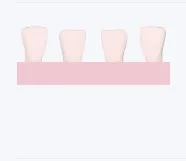 |
Total Denture |
A denture replacing every tooth of the arch. | A pink base under the arch; the denture’s teeth pale pink. |
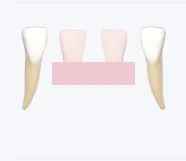 |
Partial Denture |
A denture replacing only some of the teeth. | The base under the denture’s teeth only. |
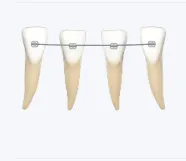 |
Fixed appliance |
A fixed orthodontic appliance, metal or ceramic. | Brackets and the wire between them; ceramic brackets are lighter. |
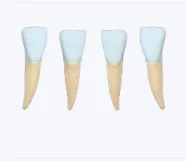 |
Aligners |
Clear aligners that straighten the teeth. | Clear blue over the crowns. |
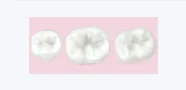 |
Removable appliance |
An orthodontic appliance the patient takes out. | The plate, under the biting surfaces. |
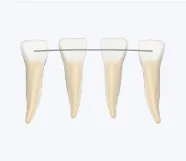 |
Fixed Retainer |
A wire bonded behind the front teeth, holding them in place after orthodontic treatment. | A wire behind the front teeth. |
What the periodontal chart shows
Section titled “What the periodontal chart shows”Noted under Probing, in the tooth’s panel. Every value also shows as a number, not by colour alone.
| Drawing | On the odontogram | What it means | How you recognise it |
|---|---|---|---|
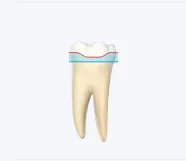 |
Probing |
The gum’s edge and the probing depth, at six points on every tooth. | Red: the edge of the gum. Blue: the bottom of the pocket; the band above it is the pocket. |
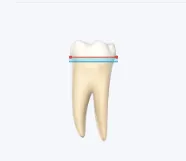 |
Bleeding on probing |
Where the gum bled when probed. | A red dot on the gum’s edge, at the site that bled. |
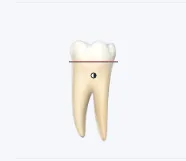 |
Furcation |
Bone has receded where the roots part, graded 1 to 3. | A circle where the roots part: empty for grade 1, half filled for grade 2, filled for grade 3. |
 |
Mobility |
How much the tooth moves, graded 1 to 3. | Above the tooth: arrows either side of the grade. |
 |
A deep pocket |
A probing depth of 4 mm or more. | The value, on orange, under the tooth number while probing. |
 |
A healthy depth |
A probing depth under 4 mm. | The value, on green. |
What the tooth number shows
Section titled “What the tooth number shows”| Drawing | On the odontogram | What it means | How you recognise it |
|---|---|---|---|
 |
Caries to treat |
The tooth has untreated caries. | The tooth number, on red. |
 |
In the history |
How many times the tooth was worked on. | A number beside the tooth number, filled for the visit chosen in History. |
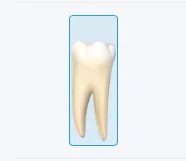 |
Already noted with the brush |
When you note one finding on several teeth, the teeth you have already noted it on. | Outlined in blue; a blue ring in the 3D view. |
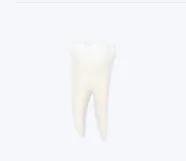 |
Faded |
The tooth has nothing to do with what is open, for example the plan shown. | Drawn faded. |
What the plans and today’s visit show
Section titled “What the plans and today’s visit show”| Drawing | On the odontogram | What it means | How you recognise it |
|---|---|---|---|
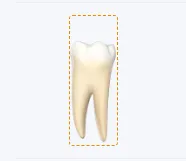 |
Treatments planned |
The tooth has treatments in the plan shown. | A dashed orange outline; a hatched orange ring in the 3D view. |
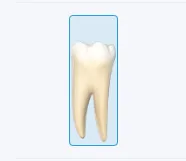 |
Tooth picked in the plan |
The tooth you are adding procedures to in the plan. | Outlined in blue. |
 |
Planned |
The stage the tooth’s next treatment belongs to. | The stage’s label, for example “Stage 2”. |
 |
Performed |
Everything planned on the tooth is done. | A tick on green. |
 |
Today |
The tooth has treatments on today’s visit. | The “today” label. |
 |
Doctor |
The doctor of the tooth’s last treatment. | A dot in the doctor’s colour, under the tooth number. |
What covers what
Section titled “What covers what”A crown, an implant, a bridge pontic, a missing tooth or a retained root describe the tooth as it is now. Caries and fractures noted on that tooth before are no longer drawn, but they stay in the tooth’s history. A root canal is drawn together with any of them, for example under a crown.